Digimos.
Empowering Excellence in
Digital Marketing and Online Sales.
What you need:
10 minutes to read this article
10 minutes to review your recent social media posts
5 minutes to access further resources
What to post?
I've heard people call social media a ‘digital billboard’ or a ‘new shopfront’. I don't think it's either of those. I think it's better to view your social media presence as your local ambassador - gently raising awareness and spreading a good word.
Your social media page should build a narrative around what your business does, how you do it, and the people making it happen.
Without knowing your business inside out, I can't give you a full social media plan, but I can point you in the right direction. To start, take a look at the infographic below. It’s worth reading through; I’ll expand on the ideas afterwards, but I won't repeat the points.
Since you know your business best, you have to decide what form the posts I mention below take. For example, I was recently talking to a blinds installation company. Their website was all about being a family business; the wife runs the office, the husband installs the blinds, and they love working in the community etc. That was all great.
Their social media, however, was very corporate and cold. It showed great-looking blinds installed in people's homes, but it ended up looking like a brochure. There is a place for that - on their Instagram grid section, for instance - but the Stories, Reels, and Highlights sections should have been filled with behind-the-scenes footage, 'meet the team' clips, and work-in-progress updates. That way, the social channels would have matched the warm brand the owners were aiming for. Most people who found them would have only seen their 'Instagram brochure', and nothing else.
Essentially, they were stuck on point one (see below). While their feed looked sleek, and I understand why they did it, a wider variety of posts would have served them better. If they didn't want to disrupt the 'glossy brochure' look of their main feed, they could have used Stories and Reels for the other types of content listed in the infographic below. If it were me, though, I wouldn't treat Instagram as a brochure. I would treat it as a window into my team's day-to-day. That would be their choice to make, though, not mine, as what you do, is yours.
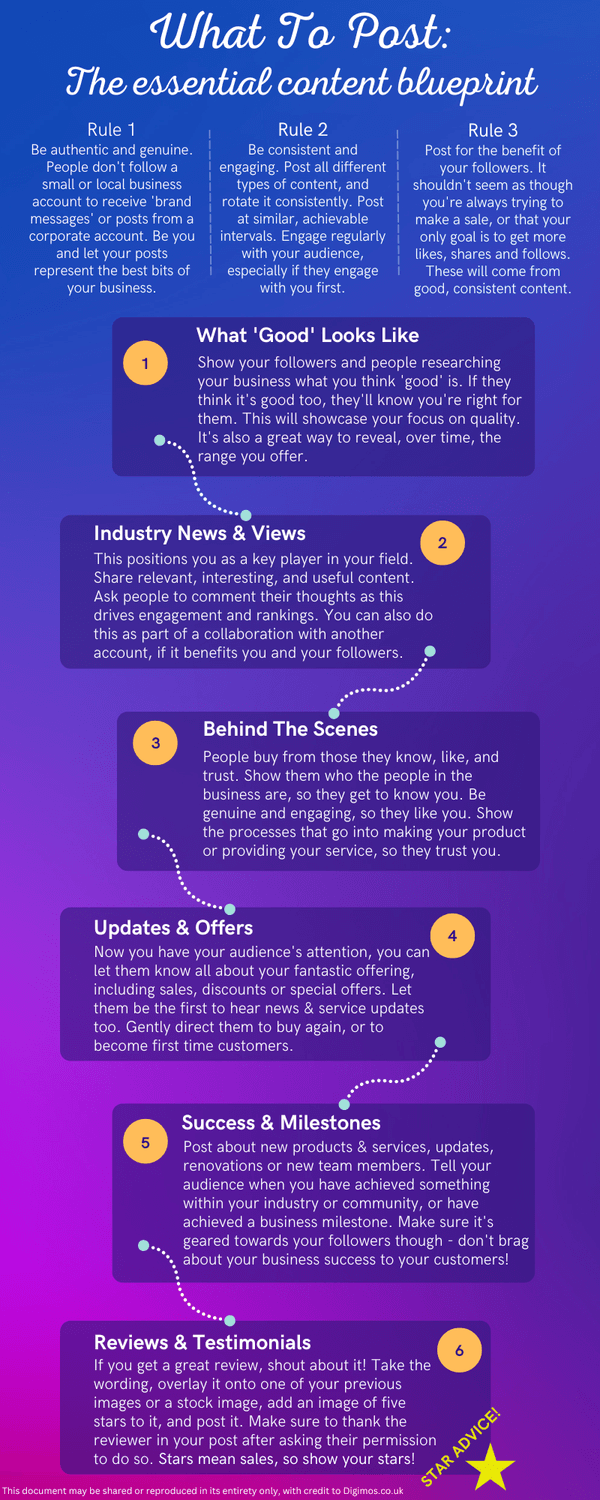
Hopefully, that blueprint gives you a clearer framework to work from. It will work for most small businesses so please don't assume that because its a one minute read and not a full course, that it doesnt tell you all you need to know.
If you think that I'm suggesting you do too many different types of content, and you want to keep your feed as it is, try the different types of posts as stories - see the response and then reevaluate. Let's go back to my example of the blinds company, (bless them - if you're reading this, I'm not picking on you - your socials and your website ARE world class, just a little mismatched) you can see exactly where they went wrong. They were laser-focused on Point 1: What 'Good' Looks Like.
As I said, you do need that, and it is an essential part of the social media mix. You need to show potential customers that you do quality work. If you call something 'good', and your prospective customers agree, they are more likely to become a customer of yours.
But because they completely ignored Point 3: Behind The Scenes, they missed out on the 'know, like, and trust' factor. By skipping the human element, they were missing out on an opportunity to connect.
To use this blueprint effectively, don't think of numbers 1 through 6 as a list you have to work through in order. Think of them as ingredients. You need to mix them up to bake your brownie the way you think your prospective customers will like it.
If you look at Rule 2 at the top of the graphic, it mentions rotating your content. This is key. If you spend a whole month just posting Updates & Offers (Point 4), people will tune out. It feels like spam, and as I said at the top, you shouldn't treat your socials like a digital billboard. However, if one were to sandwich that offer between a helpful piece of Industry News (Point 2) and a glowing Review (Point 6), you will have earned the right to sell to them - people do expect the explicit sale too!
Here's how to apply this today:
Look at your last 20 posts. Which numbers from the infographic do they match? If they are all number 1 or 4, you know what you need to do next. You should inject some personality (3) or some social proof (6). And vice versa. Remember to look at all of your posts - reels and stories too.
Your social media isn't there to shout about what you sell. As the graphic says in Rule 3, it’s there to benefit your followers, those who are checking you out before connecting with you, and those who stumble upon your account. If you can shift your mindset from "what do I want to say?" to "what do they need to see?", you’re halfway to winning.
Know, Like, trust - a sales secret.
I say above that people buy from those they 'know, like, and trust'.
That's one of my 7 sales secrets, and why it's so important that you use social media with this in mind. It really is all about using those little images to build one big picture. A picture of a business that feels familiar, personable and trustworthy.
Members of Digimos Premium get access to my other 6 sales secrets. These secrets are a simple, effective set of principles that, when applied, increase sales in a natural and organic way. You can find out more about how to become a Digimos Premium member here.
Logistics
If you have read my book 'Digital Doctrine' (see my homepage for more ), you'll already know that the defining principle in a digital marketing campaign isn't sales secrets, or alone, it's logistics.
Logistics is about resource management. Getting the right things to the right place, and at the right time. Logistics are important for enormous systems like global air travel, the military, and supermarkets. but logistics are equally important to small businesses.
If you are intending to do all of your social media posting by logging into your Meta Business Planner, or worse, the social media app itself, and hitting post, then I've got to tell you that this is not the best way of doing things. It takes up time, it's unreliable, and most importantly of all: it saps your mental energy. Much better to use a social media scheduler. I link to a free one in my resources section. But, my online presence platform, 'Shine Online', has a posts calendar that is perfectly matched to everything I teach about social media posting, along-side SEO based posts, and really, all things 'online presence'.
It's great to get everything on one dashboard, and Shine Online is an industry-leading platform, perfect for small-to-medium-sized businesses. Here's more great news: I've priced it to be as accessible to as many businesses as possible. Please do check it out here!
That's my sales pitch done - don't forget that in my resource cache, there's a link to a free social media scheduler that will post your posts for you, and you can download my book on digital marketing for free right now!
Happy posting!